
Cherrypop.ai publishes this Chai AI review, and we make a competing AI companion app. We used a free Chai account ourselves and tested the chai-ai.com web app on September 27, 2026; here is exactly what we checked.
Verdict
Chai’s web app gives you fast, in-character chat with a huge library of user-made bots, and the free plan let us chat without hitting a message cap in our seven-message test. Almost everything else is paywalled: images, video, voice and character creation all asked us to upgrade on the first click, and two paywalls showed different struck-through “original” prices for the same Pro year.
The Pro trial is free for 24 hours and then becomes a $159.99 yearly plan unless you cancel. Chai’s FAQ says you cancel in account settings; we could not find them on our free account and did not start a trial.
Score: 5/10. We scored chat quality, what the free plan actually includes, price clarity and billing, and creator tools. Fast, in-character chat earns the points. Paywalls on every media and creation feature, two different “original” prices for the same plan, and a cancel option we could not locate on a free account lose them.
- Best for: quick, casual text roleplay with ready-made community characters, on a free account.
- Skip it if: you want to build your own character, generate images of it, or you want images, voice or creation without a paid plan.
Chai quick facts
| Item | Details (as of September 2026) |
|---|---|
| Product reviewed | Chai web app at chai-ai.com (Chai’s FAQ says the web product and the Chai app are separate platforms) |
| Free plan | Basic: chat with a “Limited” share of the character library, no CHAI Ultra model, no persisted memory |
| Pro | $9.99/week or $159.99/year; 24-hour free trial that renews at $159.99/year |
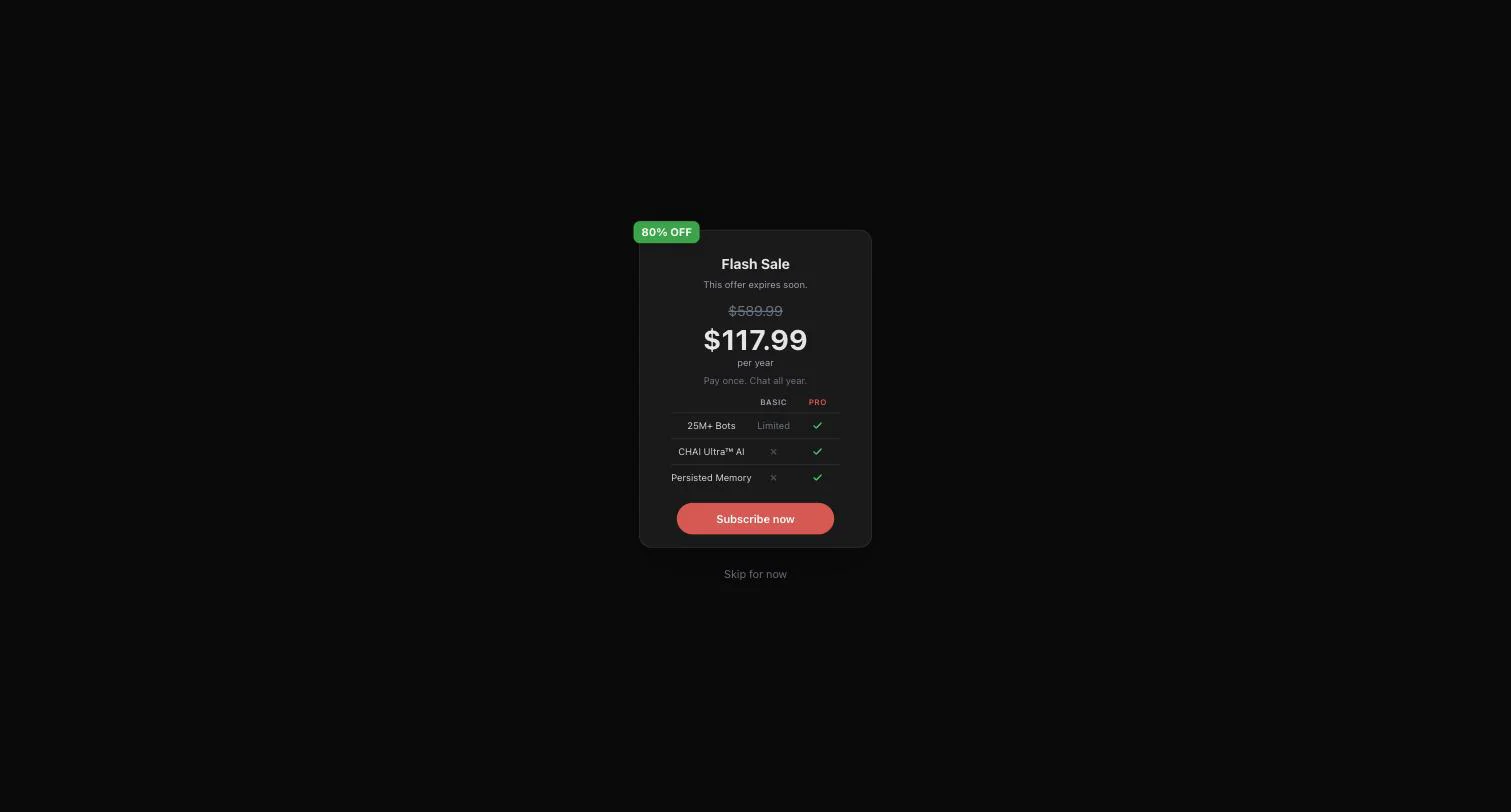
| Sale price we saw | $117.99 per year on an “80% OFF Flash Sale” paywall ($589.99 struck through) |
| MAX add-ons (for Pro) | $0.66 per 1,000 tokens, or $90/month |
| Images | $0.12 per image, pay as you go |
| Character creation | Chai Studio, a MAX feature |
| Adult content | Its FAQ says Chai AI is intended for adult users; mature content may carry an NSFW label |
| Operator | Chai Research Corp. |
How we tested
On Sunday, September 27, 2026, between about 2:24 and 2:31 pm Pacific, we used a logged-in free account on the chai-ai.com web app in desktop Chrome. The sidebar badge read BASIC. We checked:
- The upgrade paywall, the Plans & Pricing page (PRO, MAX and IMAGES tabs) and the flash-sale offer
- A seven-message, safe-for-work test chat with a popular community character, noting how fast each reply arrived and counting its words
- The Memory panel, and the Image, Video and voice buttons inside the chat
- The Create page (Chai Studio)
- Settings, the profile menu and the footer links to the terms, privacy policy and FAQ
What we did not test: any paid plan, the free trial, image or video generation, voice playback, the Regenerate button, explicit content, or cancellation. We could not create a private test character, because the creator is locked behind MAX. We also did not test the Chai mobile app. Chai’s FAQ says the web product and the app are separate platforms with no data sharing, so the app’s plans and features may differ. Other pricing and policy details come from Chai’s pricing page, FAQ, terms and privacy policy.
Pricing and plans
Chai’s web pricing has three layers: the free Basic plan, a Pro subscription, and pay-per-use extras (MAX and images) on top of Pro.
Basic (free)
The paywall’s comparison table lists Basic with “25M+ Bots: Limited”, no “CHAI Ultra™ AI” and no “Persisted Memory”. Chai does not state a daily message cap anywhere we looked, and we did not hit one in our seven messages.
Pro
The pricing page offers three ways into Pro, all with the same benefits: “Unlock 25M Characters”, “Access to Most Advanced Chat AI”, “No Ads, No Sponsored Content”, “Priority response speed” and “Cancel Anytime”.
- Free Trial: “Try Chai AI Pro for free for 24 hours”, “$0 today”, “Then $159.99/year”.
- Annual Plan: $159.99 a year, which Chai puts at $13.33 a month.
- Weekly Plan: $9.99 a week, shown as “60% OFF” a struck-through $24.99.

The math: 52 weeks at $9.99 comes to $519.48 a year, about $43.29 a month, so the weekly plan costs about 3.2 times as much as the annual one over a full year. Read the trial twice: after 24 hours, the $159.99 annual plan starts unless you cancel.
The flash sale and the struck-through prices
The feed had a persistent top banner reading “80% OFF Flash Sale” with a countdown, and the sale modal said “This offer expires soon.” The countdown read 17:27:92, 16:51:06, 11:56:22, 11:41:29 and 11:15:73 across our visits to the feed over about seven minutes. The timer does not label its units, so we cannot say when the offer ends, or whether it resets.
The sale paywall offered Pro at $117.99 per year, “Pay once. Chat all year.”, with $589.99 struck through. That is $42 less than the $159.99 list price, about $9.83 a month. Earlier in the same session, the regular trial paywall (reached from the BASIC badge) struck through $319.99 instead, over “$0.00 today, then $159.99/year”. The same Pro year was anchored to two different “original” prices in the same session, so judge the offers by what you actually pay, not by the percentage off.

MAX and images
Chai calls MAX “add-ons for PRO subscribers.” CHAI MAX Auto costs $0.66 per 1,000 tokens, with “No rate limits” and usage-based billing. CHAI MAX Monthly costs $90 a month for a “2x Rate Limit”. Image generation is a separate pay-as-you-go line at $0.12 per image.
Creating a character
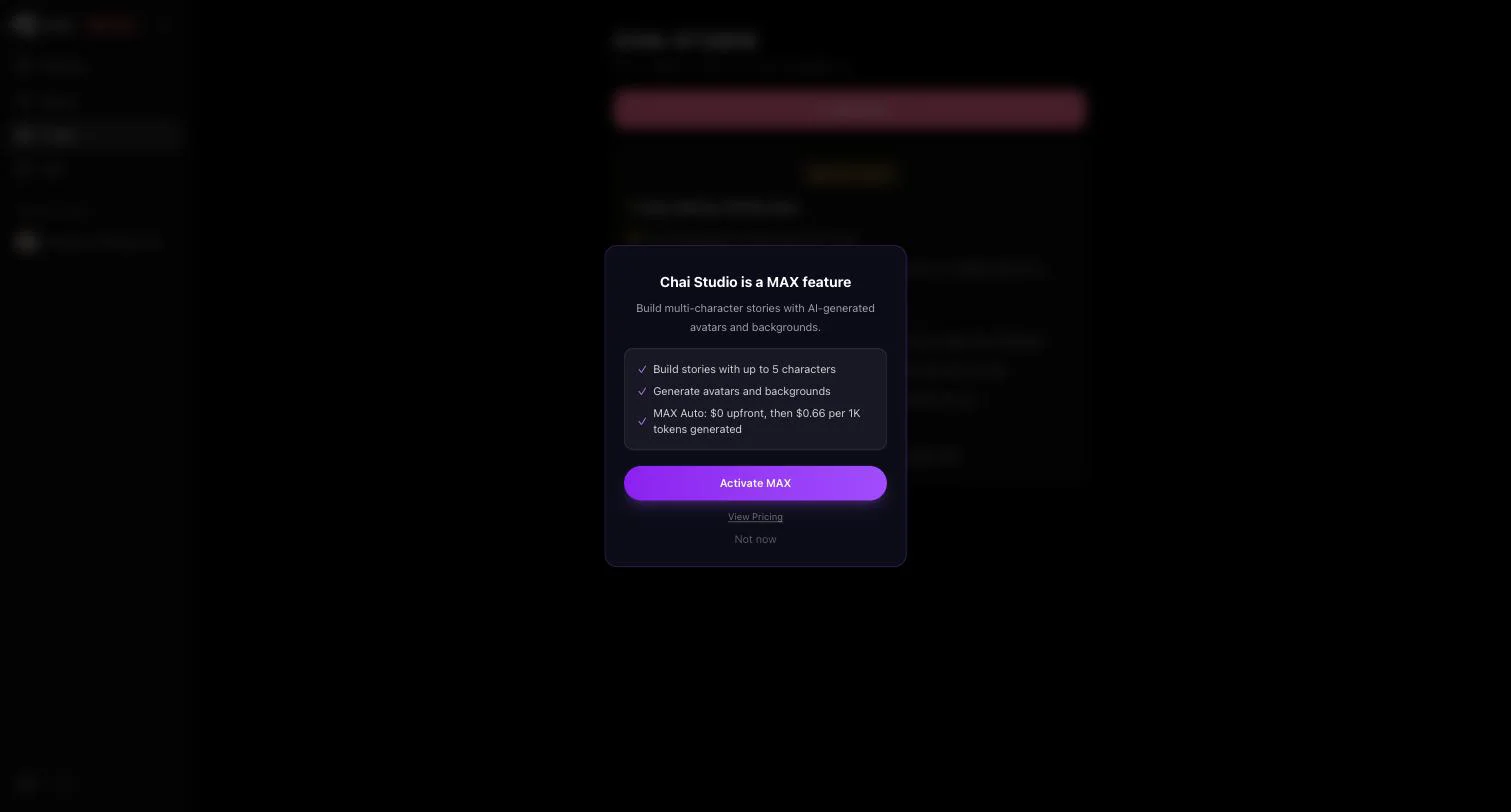
On the web, you cannot build your own character on a free account. The Create button opens Chai Studio, marked “only on MAX”. Its feature card promises a guided process: describe your idea, “add up to 4 characters and turn it into a group chat”, generate character images, and have the personality and first message written for you.
Clicking “new story” opened a gate: “Chai Studio is a MAX feature”, with “Build stories with up to 5 characters” and “MAX Auto: $0 upfront, then $0.66 per 1K tokens generated”. The card says four characters and the modal says five. Chai’s pricing page calls MAX an add-on for Pro subscribers, so on the web, creating a character appears to need Pro plus MAX. We could not see the creator’s fields, avatar options or visibility default, and we did not create a test character on Chai.
Chat quality and memory
Our test chat
We picked a featured community character with no PRO ribbon and 5.2 million chats: a reserved, protective husband at a family-estate gathering. The scenario and all seven of our messages were safe for work.
- Speed: the typing indicator showed for 4 to 9 seconds per reply. Fast and consistent.
- Length and style: replies ran 41 to 78 words, about 67 on average, all third-person narrative prose with some dialogue.
- Staying in character: yes. The character stayed guarded and quietly tender throughout, and it kept track of a rival we invented (Moretti) across several turns.
- Slips: the narration pronouns drifted between “you”, “she/her” and “they” (our persona had no gender set), and one reply had a grammar error (“as he escorting you out”).
Seven messages cannot show long-term memory, so we make no claim about long stories.
Memory, and the upsell that ate a message
Right after the second reply, a modal appeared: “Unlock Permanent Memory with Chai Pro Plan. Characters remember your personality, preferences, and story details across every conversation.” We clicked outside to close it, and the message we had typed next was swallowed by the modal and not sent. We had to send it again.
The Memory button in the chat’s side panel opened a “Permanent Memory” panel on our free account without a paywall. Its Character tab was already filled in: gender, nickname, pronouns, personality and appearance, plus an empty “Facts They Must Remember” box and a Save button. We did not click Save, so we cannot say whether edits persist on Basic. The paywall table lists persisted memory as Pro only.
Images, video and voice
On our free account, the Image, Video and voice buttons on each reply opened an upgrade modal on the first click: “Unlock Image Generation”, “Unlock Video Generation” and “Unlock Voice Messages”. No free generation was offered.
All three modals share one checklist: “Unlimited Generations”, “Unlimited Retries”, “No limits. Advanced AI”, “3 free images per day”, “1 free video per day” and “3 free voice messages per day”. Because the daily allowances sit inside an upgrade-to-Pro list, it is unclear whether they describe the free plan or Pro. On Basic, each first click opened the upgrade modal rather than a free generation. The IMAGES tab of the pricing page separately lists images at $0.12 each, pay as you go.

Safety, privacy and billing
Content rules and age
Chai’s FAQ says the platform is “intended for adult users only”, that content with mature language or themes may carry an NSFW label, and that users can report content. Its terms say user contributions must not be “obscene, violent, harassing, or otherwise objectionable.” The top of our chat showed the line “All Characters on the platform are presumed to be adults (aged 18 and above).” No age check appeared during our logged-in session, and we found no content-filter setting in the web app.
Privacy
Per its privacy policy (last updated May 19, 2026), conversation data is stored in Chai’s systems, and Chai uses “personal data derived from in-app conversations to enhance AI models”, removing personal identifiers first. Data may be kept for the life of the account plus five years after deletion; you can request erasure.
The FAQ says Chai “does not share your personal data with any third parties.” The privacy policy describes more sharing: per the policy, it shares data with suppliers that run the app, uses personal data to serve ads to free users based on consent, and, if you installed through an ad, “may share certain usage patterns with advertising partners for campaign attribution.” Keep personal details out of your chats.
Billing and cancelling
Chai’s FAQ says you “can cancel your subscription at any time from your account settings” and keep Pro until the end of the billing period. On our free account we could not find those settings. Clicking the profile button three times opened nothing, and chai-ai.com/settings returned a 404. We did not start a trial, so we could not check the cancel flow. If you take the 24-hour trial, find the cancel option right away, before the $159.99 charge.
Mind the address, too. The web app is at chai-ai.com. The older chai.ml address now redirects to the company site, chai-research.com, where the “CHAI WEB” button was marked “Coming Soon” when we checked. Avoid unofficial sites or app downloads using the Chai name.
Pros and cons
Pros
- Fast replies: 4 to 9 seconds in our test chat
- The character stayed in character and tracked an invented detail across turns
- Free chat with no message cap in our seven-message test
- A very large library of user-made characters, 25 million per Chai
- No display ads on the web app in our session
Cons
- Character creation is a MAX feature, and MAX is sold as a Pro add-on
- Images, video and voice were all paywalled on the first click
- The 24-hour trial renews into a $159.99 yearly plan
- Two different struck-through “original” prices for the same Pro year in one session
- No settings or cancel control we could find on the free plan
- An upsell modal swallowed one of our messages
- Per its privacy policy, conversations are used to improve its AI models
How it compares to Cherrypop
Both run in the browser and start free. Chai is a broad social platform of user-made bots, with extras behind Pro and MAX. Cherrypop.ai is an 18+ platform built for uncensored AI companion chat and roleplay, with age checks where the law requires them.
- Characters: a large catalog of ready-made characters (female, male and trans; realistic and anime styles), including personality types like tsundere, yandere and kuudere, plus a create-your-own wizard at cherrypop.ai/create.
- Images: AI image generation of your character, realistic or anime, including NSFW.
- Access and price: web-based, works in mobile browsers, no app install needed. It is free to start, with limits; final character creation and image generation use Cherries or a premium plan (see pricing on the site).
We have not run the same seven-message test on Cherrypop, so we make no claim about which one replies faster or stays in character better. For more options, see our picks of the best free adult AI platforms and the best AI companion apps.
Chai AI review: who should pick it, who should skip it
Pick Chai if you mostly want quick text roleplay with characters other people have already built, and you are happy to stay on the free plan. If you upgrade, annual beats weekly by a wide margin.
Skip it if you want to design your own companion (Pro plus MAX) or see and hear it (Pro) without paying. Skip the trial unless you are ready to cancel within 24 hours or pay for a year. Weighing it against Character.AI? See our Character AI review.
FAQ
Is Chai AI completely free?
No. Chat is free to start on Basic, and we hit no message cap in our test, but Basic has a limited library and no persisted memory, and media and character creation need Pro or MAX. On the web, Pro costs $9.99 a week or $159.99 a year as of September 2026; the app may differ.
Is Chai AI trustworthy?
It is run by Chai Research Corp., a US company. Be careful with billing: the free trial becomes a $159.99 yearly plan, two paywalls showed different struck-through prices for the same plan, and we could not find the cancel settings on a free account.
Does Chai AI read your chats?
Per its privacy policy, conversations are stored on Chai’s systems, authorised staff can access personal data, and conversation data is used to improve its AI models after identifiers are removed. Assume anything you type can be stored and used.
Which is better, Chai or c AI?
They suit different people. Character.AI is a general-audience platform with a firm content filter on every plan and no message cap on its standard free chat style. Chai’s FAQ says it is intended for adults and gives you fast free chat with community bots, but locks creation and media behind paid plans.
How do I cancel Chai Pro?
Chai’s FAQ says you cancel from your account settings and keep Pro until the end of the billing period. We could not find them on a free account and did not test cancelling, so locate the option as soon as a trial starts.